शॉपिंग कार्ट में कोई डोमेन नहीं
जब डिज़ाइनर के कोट्स $2,500 तक पहुँच जाते हैं लेकिन आपको अगले सप्ताह तक एक लोगो चाहिए, तो AI लोगो जनरेटर स्पष्ट समाधान लगते हैं। लेकिन यहां कड़वा सच है: अधिकांश AI लोगो स्पष्ट रूप से AI-जनित दिखते हैं। जो व्यवसाय पेशेवर परिणाम प्राप्त कर रहे हैं वे अलग-अलग टूल का उपयोग नहीं कर रहे हैं—वे अलग-अलग रणनीतियों का उपयोग कर रहे हैं।
आम गलती यह है कि सीधे टूल्स पर कूद पड़ना, रणनीतिक तैयारी को पूरी तरह छोड़ देना। व्यवसाय मालिक सैकड़ों औसत विकल्प बनाते हैं, विविधताओं पर क्लिक करने में घंटों बिताते हैं, और अंततः "काफी अच्छा" पर समझौता कर लेते हैं क्योंकि वे इस प्रक्रिया से थक जाते हैं। वास्तविकता यह है कि एक $20 AI लोगो जो "सस्ता" चिल्लाता है, और एक जो पेशेवर रूप से डिज़ाइन किया गया दिखता है, के बीच का अंतर आपके द्वारा चुने गए AI लोगो मेकर से कोई लेना-देना नहीं है।
यह गाइड रणनीतिक ढांचा प्रदान करता है जो AI दक्षता को पेशेवर गुणवत्ता के साथ जोड़ता है। आपको विशिष्ट प्रॉम्प्ट मिलेंगे जो वास्तव में काम करते हैं, गुणवत्ता जाँच सूचियाँ जो पेशेवर उपयोग करते हैं, और परिष्करण तकनीकें जो अन्य ट्यूटोरियल में पूरी तरह अनुपलब्ध हैं। सबसे महत्वपूर्ण बात, आप सीखेंगे कि जनरेट पर क्लिक करने से पहले और बाद में क्या होता है—वे हिस्से जो वास्तव में निर्धारित करते हैं कि आपका लोगो पेशेवर दिखता है या शौकिया।
AI लोगो मेकर का उपयोग क्यों करें? (और कब इससे बचें)
एआई लोगो जनरेटर एक पेशेवर डिजाइनर को काम पर रखने की तुलना में काफी समय और पैसा बचाते हैं। के अनुसार उद्योग अनुसंधान, फ्रीलांस डिज़ाइनर $250-$2,500 के बीच शुल्क लेते हैं, जबकि एजेंसियाँ लोगो डिज़ाइन के लिए $10,000 तक शुल्क ले सकती हैं। $20-99 पर AI टूल बूटस्ट्रैप्ड स्टार्टअप्स के लिए लोगो डिज़ाइन को सुलभ बनाते हैं। लेकिन वे हर स्थिति के लिए सही नहीं हैं, और यह जानना कि उनका उपयोग कब करना है बनाम पेशेवर को कब नियुक्त करना है, बाद में आपको महंगी रीब्रांडिंग से बचा सकता है।
AI लोगो जनरेटर का उपयोग करने का व्यावसायिक आधार सबसे मजबूत है जब गति महत्वपूर्ण हो और आपकी लॉन्च समय-सीमा दिनों या हफ्तों में मापी जाती है, महीनों में नहीं। यदि आप प्रारंभिक ब्रांडिंग के लिए सख्त बजट बाधाओं के साथ काम कर रहे हैं, तो AI उपकरण एक व्यवहार्य मार्ग प्रदान करते हैं।
वे परीक्षण चरण के दौरान विशेष रूप से प्रभावी होते हैं जब आप बड़े निवेश करने से पहले एक व्यावसायिक अवधारणा को मान्य कर रहे होते हैं, या जब आपकी ब्रांड की ज़रूरतें अपेक्षाकृत सीधी होती हैं। मुख्य आवश्यकता यह है कि आप DIY दृष्टिकोण के साथ सहज हों और रणनीतिक प्रक्रिया सीखने में समय लगाने के लिए तैयार हों।
हालाँकि, कुछ स्थितियों में आपको AI को छोड़ देना चाहिए। कानूनी, चिकित्सा और वित्तीय सेवाओं जैसे उच्च विनियमित उद्योगों में अक्सर जटिल प्रतीकों की आवश्यकता होती है जिन्हें AI उपकरण उचित रूप से पकड़ने में संघर्ष करते हैं। यदि ट्रेडमार्क विशिष्टता मिशन-महत्वपूर्ण है क्योंकि आप एक संतृप्त प्रतिस्पर्धी बाजार में काम कर रहे हैं, तो AI उपकरणों की टेम्पलेट-आधारित प्रकृति एक दायित्व बन जाती है। इसी तरह, यदि आपको सैकड़ों संपत्ति विविधताओं के साथ व्यापक ब्रांड सिस्टम की आवश्यकता है, तो आवश्यक समन्वय वहाँ से अधिक है जो AI उपकरण कुशलतापूर्वक प्रबंधित कर सकते हैं।
2025 में लगभग 80% लोगो डिज़ाइन प्रक्रियाएँ अब AI सहायता के किसी न किसी रूप को शामिल करते हैं, जो मुख्यधारा की पेशेवर अपनाने को प्रदर्शित करता है। यह बताता है कि AI डिजाइनरों की जगह नहीं ले रहा है—यह बदल रहा है कि लोगो डिजाइन कैसे होता है।
सर्वश्रेष्ठ AI लोगो जेनरेटर: सही टूल कैसे चुनें
सबसे अच्छा AI लोगो मेकर आपकी विशिष्ट आवश्यकताओं पर निर्भर करता है, न कि सामान्य रैंकिंग पर। रणनीतिक उपयोग वाला एक बजट टूल खराब उपयोग वाले महंगे टूल से बेहतर प्रदर्शन करता है। तीन मानदंडों पर ध्यान केंद्रित करें: फ़ाइल प्रारूप आउटपुट (SVG/EPS आवश्यक), अनुकूलन गहराई, और व्यावसायिक उपयोग अधिकार।
| टूल |
सर्वोत्तम के लिए |
मूल्य सीमा |
विशिष्ट विशेषता |
वाणिज्यिक अधिकार |
| Looka |
गुणवत्ता + गति |
$20-129/वर्ष |
300+ ब्रांड किट टेम्पलेट्स |
पूरा (खरीद के साथ) |
| Canva |
बिल्कुल शुरुआती |
मुफ़्त-$15/महीना |
सहज ड्रैग-एंड-ड्रॉप |
योजना की शर्तें जांचें |
| ब्रांडमार्क |
अधिकतम नियंत्रण |
एकमुश्त $25-65 |
खरीद के बाद असीमित संपादन |
फुल |
| Logo.com |
सीमित बजट |
फ्री-$20 |
तुरंत मुफ्त जनरेशन |
पूर्ण (सशुल्क योजनाएँ) |
| Design.com |
पूर्ण ब्रांडिंग |
$49+ पैकेज |
10,000+ डिज़ाइन विविधताएँ |
फुल |
आवश्यक चयन मानदंड:
-
स्केलेबिलिटी के लिए वेक्टर फाइलें (SVG/EPS)
-
वेब उपयोग के लिए पारदर्शी PNG
-
पूर्ण व्यावसायिक उपयोग अधिकार
-
खरीद के बाद एडिट करने की सुविधा
लोगो बनाने से पहले अपना ब्रांड ब्रीफ परिभाषित करें
यहाँ वह चीज़ है जो पेशेवर दिखने वाले AI लोगो को शौकिया लोगो से अलग करती है: रणनीतिक तैयारी। हर शीर्ष-रैंकिंग लेख आपको "अपना व्यवसाय नाम दर्ज करें और रंग चुनें," बताता है, लेकिन कोई भी आपको पहले ब्रांड ब्रीफ पूरा करने के लिए नहीं कहता। यह तैयारी दर्जनों औसत लोगो उत्पन्न करने और पहले प्रयास में उत्कृष्ट विकल्प प्राप्त करने के बीच का अंतर है।
रणनीति उपकरण चयन को क्यों मात देती है
AI ठीक वही उत्पन्न करता है जो आप उसे बताते हैं, इसलिए इनपुट गुणवत्ता सीधे आउटपुट गुणवत्ता निर्धारित करती है। "आधुनिक तकनीक लोगो, नीला" सामान्य परिणाम देता है क्योंकि इनपुट स्वयं सामान्य है। "B2B Saa S प्लेटफ़ॉर्म जो एंटरप्राइज़ CTOs को लक्षित करता है, सुरक्षा और नवाचार बताता है, ज्यामितीय अमूर्त चिह्न, चांदी एक्सेंट के साथ गहरा नीला, न्यूनतम" केंद्रित, रणनीतिक परिणाम देता है क्योंकि आपने AI को स्पष्ट दिशा दी है।
पहले जवाब देने के लिए रणनीतिक प्रश्न
कोई भी उपकरण छूने से पहले, इन रणनीतिक तत्वों को स्पष्ट करें:
ब्रांड आधार:
-
आपका एक-वाक्य का एलिवेटर पिच क्या है?
-
आपके ब्रांड का वर्णन करने वाले पांच विशिष्ट विशेषण कौन से हैं?
-
आपका लक्षित ग्राहक कौन है?
प्रतिस्पर्धात्मक स्थिति:
-
आपके शीर्ष 3 प्रतियोगी कौन हैं और उनके लोगो के तरीके क्या हैं?
-
आपके उद्योग में कौन से रंग हावी हैं?
-
आप दृश्य रूप से अंतर कैसे करेंगे?
व्यावहारिक आवश्यकताएँ:
-
आपका लोगो कहाँ दिखना चाहिए?
-
आपके ब्रांड को कौन से रंग दर्शाते हैं?
-
आपके ब्रांड से कौन से प्रतीक या चित्र जुड़ते हैं?
सफलता मानदंड:
-
आपका लोगो दर्शकों में क्या भावना जगाए?
त्वरित प्रतिस्पर्धी ऑडिट
अपने शीर्ष 5 प्रतिस्पर्धियों को Google करें और उनके लोगो का विश्लेषण करें। अपने उद्योग में प्रभावी रंग पैटर्न पर ध्यान दें—यदि हर कोई नीला उपयोग करता है, तो आप गर्म रंगों के साथ अंतर कर सकते हैं। अत्यधिक उपयोग किए जाने वाले प्रतीकों की पहचान करें ताकि "विचारों" के लिए बल्ब या "तकनीक." के लिए गियर जैसे क्लिच से बचा जा सके। सफेद स्थान के अवसरों की तलाश करें जहाँ सभी प्रतिस्पर्धी एक कॉर्पोरेट दृष्टिकोण अपनाते हैं, लेकिन आधुनिक सादगी टूट सकती है।
AI के साथ लोगो कैसे बनाएं: रणनीतिक निर्माण प्रक्रिया
AI के साथ लोगो बनाते समय प्रॉम्प्ट सब कुछ है। सामान्य इनपुट सामान्य आउटपुट उत्पन्न करता है। आपके ब्रांड ब्रीफ पर आधारित रणनीतिक प्रॉम्प्ट केंद्रित, प्रासंगिक विकल्प उत्पन्न करते हैं। यहां सटीक प्रॉम्प्ट संरचना है जो पेशेवर उपयोग करते हैं, साथ ही सामान्य उद्योगों के लिए कॉपी-पेस्ट टेम्पलेट भी।
7-तत्व प्रॉम्प्ट फॉर्मूला
हर पेशेवर AI लोगो प्रॉम्प्ट में ये घटक शामिल हैं:
-
लोगो प्रकार: "lettermark," "wordmark," "mascot," "abstract symbol," "combination mark"
-
शैली विवरणक: "न्यूनतम," "ज्यामितीय," "विंटेज," "आधुनिक," "हाथ-खींचा"
-
विशिष्ट दृश्य तत्व: सटीक आकार, प्रतीक, या इमेजरी
-
रंग दिशा: "नेवी ब्लू और सिल्वर," "अर्थ टोन," "मोनोक्रोमैटिक"
-
तकनीकी आवश्यकताएँ: "vector format," "flat design," "scalable," "simple"
-
पृष्ठभूमि विनिर्देश: "white background" या "transparent background"
-
नकारात्मक संकेत: "no text in icon," "no gradients," "no busy details"
🗒टिप: अपने सबसे महत्वपूर्ण तत्वों को पहले रखें - एआई शुरुआती शब्दों को अधिक महत्व देता है।
उद्योग द्वारा कॉपी-पेस्ट प्रॉम्प्ट टेम्पलेट
नीचे दिया गया प्रत्येक टेम्पलेट विशिष्ट उद्योग आवश्यकताओं के लिए डिज़ाइन किया गया है। सर्वोत्तम परिणामों के लिए ब्रैकेटेड तत्वों को अपनी ब्रांड जानकारी के साथ कस्टमाइज़ करें।
टेक स्टार्टअप / Saa S
टेक लोगो को नवाचार और विश्वास व्यक्त करने की आवश्यकता होती है, बिना घिसी-पिटी बातों में पड़े। शाब्दिक कंप्यूटर इमेजरी के बजाय ज्यामितीय अमूर्तता पर ध्यान केंद्रित करें। सबसे अच्छे टेक लोगो आकृति और रंग के माध्यम से कनेक्टिविटी, सुरक्षा या गति जैसी अवधारणाओं का सुझाव देते हैं, न कि स्पष्ट प्रतीकों के माध्यम से।
[कंपनी का नाम] के लिए एक आधुनिक, न्यूनतम लोगो बनाएं, एक [विशिष्ट तकनीक फोकस] कंपनी लक्षित [B2B/B2C ग्राहक]. ज्यामितीय अमूर्त आकार [कनेक्टिविटी/सुरक्षा/नवाचार] का सुझाव देते हुए, साफ रेखाएं, [प्राथमिक रंग] और [एक्सेंट रंग] पैलेट। [मुख्य ब्रांड मूल्यों] को दर्शाता है। वेक्टर फॉर्मेट, फेविकॉन उपयोग के लिए पर्याप्त सरल, स्केलेबल डिज़ाइन। सफेद पृष्ठभूमि.
बचें: सर्किट बोर्ड जैसी शाब्दिक तकनीकी कल्पना, एकाधिक रंग, ग्रेडिएंट्स।
खाद्य & आतिथ्य
रेस्तरां और खाद्य सेवा लोगो को गर्म और आमंत्रित महसूस कराना चाहिए, साथ ही परिष्कार बनाए रखना चाहिए। चुनौती कार्टून-शैली के खाद्य चित्रणों से बचने की है जो सस्ते दिखते हैं। समकालीन शैली जिसमें हल्का विंटेज प्रभाव हो, इस श्रेणी में अक्सर अच्छा काम करती है।
[Business Name] के लिए एक गर्म, आमंत्रित लोगो डिज़ाइन करें, एक [cuisine type/ सेवा शैली] रेस्तरां. [प्रासंगिक तत्व: घटक, बर्तन, वास्तुशिल्प विवरण] सरल आइकन के रूप में, समकालीन शैली के साथ सूक्ष्म पुराने प्रभाव। अर्थ टोन: [विशिष्ट ब्राउन, क्रीम, या एक्सेंट रंग]। दोस्ताना और सुलभ लेकिन परिष्कृत। वेक्टर डिज़ाइन।
बचें: कार्टून शैली, अत्यधिक शाब्दिक भोजन चित्रण, चमकीले प्राथमिक रंग.
पेशेवर सेवाएं
कानूनी, वित्त और परामर्श फर्मों को ऐसे लोगो की आवश्यकता होती है जो अधिकार और विश्वसनीयता दर्शाते हों। अमूर्त ज्यामितीय प्रतीक या परिष्कृत लेटरमार्क शाब्दिक कल्पना से बेहतर काम करते हैं। रूढ़िवादी रंग पैलेट स्थिरता और विशेषज्ञता को संकेत देते हैं।
[Firm Name] के लिए एक पेशेवर, आधिकारिक लोगो बनाएं, [ग्राहक प्रकार] के लिए [विशिष्ट सेवा]। अमूर्त ज्यामितीय प्रतीक या परिष्कृत लेटरमार्क। [नेवी/चारकोल/फॉरेस्ट] नीला के साथ [चांदी/सोना/ग्रे] एक्सेंट। विशेषज्ञता, विश्वसनीयता का संचार करता है, और स्थिरता। स्वच्छ सैन्स-सेरिफ़ या सेरिफ़ टाइपोग्राफी। न्यूनतम, कालातीत डिजाइन.
बचें: चंचल तत्व, चमकीले रंग, ट्रेंडी शैलियाँ, जटिल कल्पना।
रिटेल / ई-कॉमर्स
ई-कॉमर्स लोगो को छोटे आकार (ऐप आइकन) और बड़े प्रारूप (स्टोरफ्रंट) दोनों में काम करना चाहिए। बहुमुखी प्रतिभा महत्वपूर्ण है। मजबूत कंट्रास्ट के साथ बोल्ड, सरल डिज़ाइन मोबाइल स्क्रीन से लेकर भौतिक संकेतों तक सभी टचपॉइंट्स पर दृश्यता सुनिश्चित करते हैं।
[स्टोर का नाम] बेचने के लिए एक बहुमुखी, समकालीन लोगो बनाएं [product category]. [Icon representing products or shopping अनुभव] प्रतीक, आधुनिक लेकिन सुलभ शैली. [ब्रांड रंग जो लक्षित जनसांख्यिकी को आकर्षित करते हैं]. छोटे आकार में काम करना चाहिए (ऐप आइकन, 32px) और बड़े (स्टोरफ्रंट साइनेज)। वेक्टर प्रारूप, बोल्ड उच्च दृश्यता के लिए पर्याप्त.
बचें: ट्रेंडी तत्व जो डेटेड लगते हैं जल्दी, अति-जटिलता, बारीक विवरण।
रचनात्मक / वेलनेस / लाइफस्टाइल
रचनात्मक और वेलनेस व्यवसाय अधिक कलात्मक दृष्टिकोण अपना सकते हैं जबकि पेशेवर अपील बनाए रखते हैं। इन लोगो को व्यक्तित्व और रचनात्मकता दिखानी चाहिए लेकिन सुपाठ्य और कार्यात्मक रहना चाहिए। ठीक से निष्पादित होने पर हस्त-चित्रित सौंदर्यशास्त्र यहां अच्छी तरह से काम करते हैं।
[बिज़नेस नाम] के लिए एक कलात्मक, विशिष्ट लोगो डिज़ाइन करें, [विशिष्ट सेवा]। [प्रकृति तत्व, अमूर्त आकृति, या कलात्मक उपकरण] को केंद्रीय कल्पना के रूप में, अभिव्यंजक फिर भी संतुलित शैली। [विशिष्ट रंग पैलेट जो ब्रांड व्यक्तित्व को दर्शाता है]। रचनात्मकता दिखाता है और पेशेवर अपील बनाए रखते हुए व्यक्तित्व। हाथ से बनाया गया सौंदर्यपूर्ण लेकिन उत्पादन-तैयार वेक्टर।
बचें: सामान्य प्रतीक, कॉर्पोरेट कठोरता, अस्पष्ट कलात्मक तत्व।
जनरेशन रणनीति
अपने उद्योग टेम्पलेट से शुरू करें और अपने ब्रांड ब्रीफ से ब्रैकेटेड तत्वों को भरें। अपने पहले प्रॉम्प्ट के साथ 20-30 विकल्प जनरेट करें ताकि रेंज देख सकें। अपने शीर्ष 5 डिज़ाइन चुनें और परिष्कृत प्रॉम्प्ट के साथ दोहराएं। अपने सर्वोत्तम डिज़ाइनों पर विभिन्न रंग विविधताओं का परीक्षण करें। निर्णय लेने से पहले कम से कम 3 पूर्ण राउंड जनरेट करें—बाद के पुनरावृत्तियों में अक्सर महत्वपूर्ण सुधार होते हैं।
ज़रूरी लोगो वेरिएशन जो आपको बनाने चाहिए
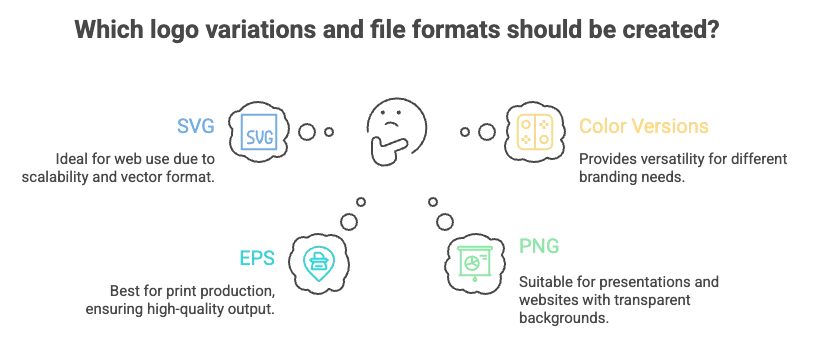
एक अकेली लोगो फ़ाइल पेशेवर ब्रांड परिनियोजन के लिए पर्याप्त नहीं है। पेशेवर ब्रांडों के पास विभिन्न अनुप्रयोगों के लिए अनुकूलित कई विविधताएँ होती हैं। जब आपके पास AI टूल तक पहुँच हो तो उन्हें अभी बनाएं—वे आपके सत्र के दौरान उत्पन्न करने के लिए मुफ्त हैं लेकिन बाद में उन्हें कमीशन करना महंगा होता है।
आवश्यक वेरिएशन:
-
पूरा लोगो (प्राथमिक): वेबसाइट, बिज़नेस कार्ड के लिए आइकन + वर्डमार्क
-
केवल आइकन: ऐप आइकन, सोशल प्रोफाइल, फेविकॉन के लिए स्क्वायर फॉर्मेट (32px पर टेस्ट करें)
-
केवल वर्डमार्क: ईमेल हस्ताक्षर के लिए टेक्स्ट-आधारित संस्करण, न्यूनतम रिक्त स्थान
-
क्षैतिज लेआउट: वेबसाइट हेडर, लेटरहेड के लिए वाइड फॉर्मेट
-
लंबवत/स्टैक्ड लेआउट: सोशल मीडिया पोस्ट, पैकेजिंग के लिए लंबा प्रारूप
अपने AI लोगो को अच्छे से पेशेवर कैसे बनाएं
AI आपको अधिकांश रास्ते तक पहुंचाता है—तेज़ और किफायती। अंतिम परिशोधन शौकिया परिणामों को पेशेवर लोगों से अलग करता है। यहीं पर अधिकांश लोग बहुत जल्दी रुक जाते हैं और स्पष्ट रूप से AI-जनरेटेड परिणामों के साथ समाप्त होते हैं। यहाँ पेशेवर परिशोधन प्रक्रिया है।
सामान्य AI लोगो समस्याएं & त्वरित समाधान
समस्या #1: अत्यधिक जटिलता
-
लक्षण: कई रंग, जटिल विवरण, प्रतिस्पर्धी दृश्य तत्व
-
सुधार: एक समय में एक तत्व हटाएं—यदि यह उसके बिना भी काम करता है, तो उसे हटा दें
-
नियम: अधिकतम 2-3 रंग, कुल 2-3 आकार
-
परीक्षण: अगर 32px पर अपठनीय हो, तो और सरल करें
समस्या #2: विकृत टाइपोग्राफी
-
लक्षण: अजीब रिक्ति, विकृत अक्षरों वाला AI-जनित टेक्स्ट
-
सुधार: Google फोंट या Adobe फोंट से वास्तविक फोंट के साथ बदलें
-
फ़ॉन्ट व्यक्तित्व को ब्रांड से मिलाएं (आधुनिक सैंस-सेरिफ़ बनाम क्लासिक सेरिफ़)
समस्या #3: सामान्य प्रतीक
-
लक्षण: क्लिच आइकन (लाइटबल्ब = विचार, हैंडशेक = साझेदारी)
-
समाधान: मानक प्रतीकों को अनुकूलित करें या अमूर्त आकृतियों का उपयोग करें
-
बेहतर: शाब्दिक प्रतिनिधित्व की तुलना में ज्यामितीय अमूर्तता
समस्या #4: खराब स्केलेबिलिटी
-
लक्षण: बड़े आकार में उत्तम, छोटे आकार में अपठनीय
-
सुधार: डिज़ाइन के दौरान 32px पर परीक्षण करें, बाद में नहीं
-
समाधान: बोल्ड आकृतियाँ, मजबूत कंट्रास्ट, पतली रेखाएँ हटाएँ
समस्या #5: ट्रेंड बनाम कालातीतता
-
लक्षण: अत्यधिक ग्रेडिएंट, नीयन रंग, वर्तमान-वर्ष की सौंदर्यशास्त्र
-
सुधार: पूछें "क्या यह 5 साल में पुराना दिखेगा?"
-
इस ओर झुकें: क्लासिक सादगी, सिद्ध रंग संयोजन
पॉलिश के लिए डिज़ाइनर कब नियुक्त करें
DIY ठीक है अगर: एआई परिणाम पहले से ही उच्च गुणवत्ता वाला है, सरल लेआउट, तंग बजट, कम जोखिम वाला ब्रांड।
परिष्कार में निवेश करें यदि: कस्टम हाथ से बनाए गए तत्वों की आवश्यकता है, प्रतिस्पर्धी बाजार में काम कर रहे हैं, लोगो प्राथमिक ग्राहक संपर्क बिंदु है।
हाइब्रिड दृष्टिकोण: एआई से शुरू करके फिर परिष्करण के लिए एक डिजाइनर को काम पर रखना अक्सर लागत और गुणवत्ता का सबसे अच्छा संतुलन प्रदान करता है।
क्या आप AI-जनरेटेड लोगो का ट्रेडमार्क कर सकते हैं?
हाँ, आप AI-जनित लोगो का ट्रेडमार्क कर सकते हैं—लेकिन महत्वपूर्ण बारीकियाँ हैं। कॉपीराइट और ट्रेडमार्क सुरक्षा के अलग-अलग रूप हैं। जबकि शुद्ध AI आउटपुट में वर्तमान कानून के तहत संदिग्ध कॉपीराइट सुरक्षा है, ट्रेडमार्क वाले लोगो आपके ब्रांड की सुरक्षा सृजन विधि की परवाह किए बिना करते हैं।
15 मिनट की ट्रेडमार्क खोज प्रक्रिया
चरण 1: USPTO TESS डेटाबेस
-
uspto.gov/trademarks पर जाएँ
-
क्लिक करें "ट्रेडमार्क डेटाबेस खोजें"
-
उपयोग करें "Basic Word Mark Search"
-
अपना व्यवसाय नाम + उद्योग कीवर्ड दर्ज करें
-
समान या भ्रामक रूप से समान चिह्न देखें
चरण 2: Google रिवर्स इमेज सर्च
-
images.google.com पर जाएं
-
कैमरा आइकन पर क्लिक करें, अपना लोगो अपलोड करें
-
दिखने में समान मौजूदा लोगो की जाँच करें
चरण 3: राज्य व्यापार रजिस्ट्री
-
अपने राज्य के सेक्रेटरी ऑफ स्टेट डेटाबेस में खोजें
-
राज्य स्तर पर नाम की उपलब्धता सत्यापित करें
पेशेवर मदद की आवश्यकता वाले चेतावनी संकेत:
-
आपके उद्योग श्रेणी में समान नाम
-
समान लोगो + समान नाम संयोजन
-
महत्वपूर्ण लॉन्च मार्केटिंग निवेश की योजना
-
अत्यधिक प्रतिस्पर्धी या मुकदमेबाजी वाला उद्योग
लोगो टेस्टिंग चेकलिस्ट: पेशेवर गुणवत्ता सुनिश्चित करें
परीक्षण के बिना लॉन्च न करें। पेशेवर डिज़ाइनर अनुमोदन से पहले कई परिदृश्यों में लोगो का परीक्षण करते हैं। यह गुणवत्ता नियंत्रण प्रक्रिया समस्याओं को तब पकड़ती है जब वे ठीक करने के लिए स्वतंत्र होती हैं।
साइज़ स्केलेबिलिटी टेस्ट
-
16px (ब्राउज़र फेविकॉन) - क्या पहचानने योग्य है?
-
32px (ऐप आइकन) - पहचानने योग्य?
-
180px (सोशल मीडिया प्रोफाइल) - स्पष्ट और तीक्ष्ण?
-
बिजनेस कार्ड पर प्रिंट आकार - पेशेवर दिखता है?
-
बड़े प्रारूप वाले साइनेज - क्या यह प्रभाव बनाए रखता है?
पृष्ठभूमि संगतता परीक्षण
-
सफेद पृष्ठभूमि
-
काली पृष्ठभूमि
-
आपकी ब्रांड रंग पृष्ठभूमि
-
फोटोग्राफिक/बनावट वाले बैकग्राउंड
-
प्रतिस्पर्धी वेबसाइटें (क्या यह अलग दिखता है?)
त्वरित दृश्य परीक्षण
स्क्विंट टेस्ट: अपने लोगो को तब तक तिरछी नज़र से देखें जब तक वह धुंधला न दिखे। क्या आप अभी भी मूल आकार की पहचान कर सकते हैं? यदि हाँ = काफी सरल है। यदि नहीं = बहुत जटिल है।
दूरी परीक्षण: प्रिंट करें और 10 फीट दूर से देखें। फिर भी पढ़ने योग्य? मुख्य आकार पहचानने योग्य?
प्रतिक्रिया संग्रह
अपने लक्षित दर्शकों में से 5-10 लोगों को दिखाएं। पूछें:
-
"आप किस उद्योग का अनुमान लगाएंगे?"
-
"क्या यह पेशेवर दिखता है या DIY?"
-
"यह कौन सी भावना उत्पन्न करता है?"
समिति द्वारा डिज़ाइन न करें, लेकिन स्पष्ट चूक को पकड़ें।
अपना प्रोफेशनल AI लोगो बनाना शुरू करें
अब आपके पास वह है जो अधिकांश व्यापार मालिक छोड़ देते हैं: वह रणनीतिक ढांचा जो शौकिया को पेशेवर AI लोगो से अलग करता है। इस प्रक्रिया को व्यवस्थित रूप से अपनाने की तुलना में उपकरण कम मायने रखता है।
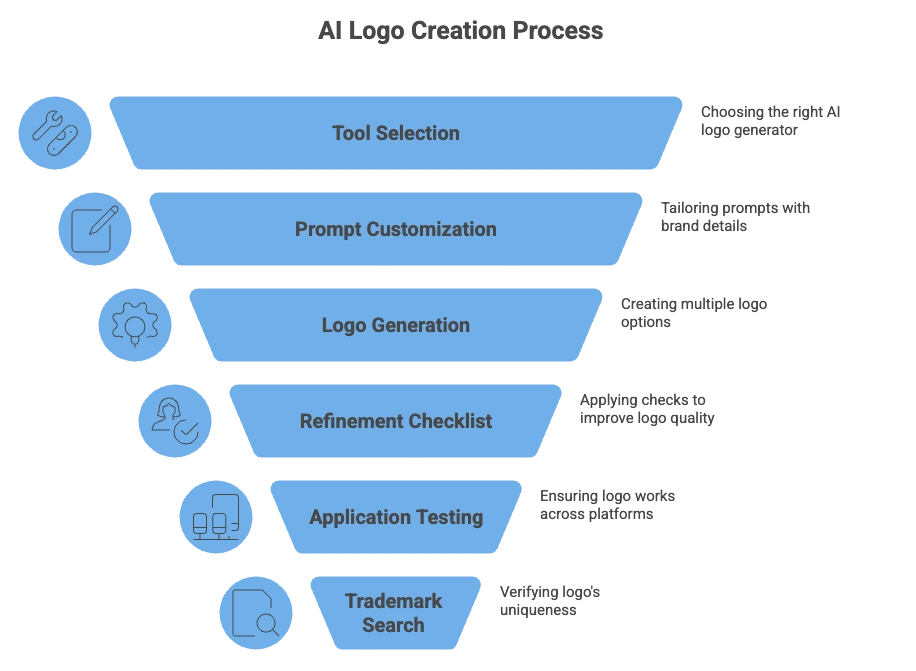
मुख्य अंतर्दृष्टि यह है कि पेशेवर दिखने वाले AI लोगो इस बारे में नहीं हैं कि आप कौन सा उपकरण चुनते हैं या आप कितना खर्च करते हैं। वे पीढ़ी से पहले रणनीतिक सोच, पीढ़ी के दौरान विशिष्ट प्रॉम्प्ट, और पीढ़ी के बाद पेशेवर परिशोधन के बारे में हैं।
रणनीतिक स्पष्टता से शुरू करें—यह बेहतर प्रॉम्प्ट देती है, बेहतर विकल्प उत्पन्न करती है, और कम सुधार की आवश्यकता होती है। कोई भी AI टूल खोलने से पहले ब्रांड पोजिशनिंग प्रश्नों के उत्तर दें। यह तैयारी घंटों की निराशाजनक क्लिकिंग बचाती है और ऐसे परिणाम देती है जिन पर आपको वास्तव में गर्व होता है।