No Domain in Shopping Cart
TL;DR
-
Google says to expect temporary ranking fluctuation during a site move, and that a small to medium site typically takes a few weeks for most pages to move over.
-
Every old URL needs its own 301 to the matching new URL. Dumping them all on the new homepage risks soft 404 treatment.
-
Google recommends keeping redirects live for at least one year, and suggests considering keeping them indefinitely for users.
-
The Change of Address tool signals the move; the redirects perform it. Submit one for every verified variant of the old domain.
-
This guide covers domain-to-domain moves only, not HTTP-to-HTTPS, CMS changes, or path restructures within one domain.
Does Changing Your Domain Name Hurt SEO?
Yes, temporarily. Anyone who tells you a migration is risk-free is selling something.
When you move to a new domain, every URL on your site changes. Google has to recrawl, re-evaluate, and reindex each one, and that takes time. Google's own guidance says to expect temporary ranking fluctuation during a move, and that a site's rankings settle down over time.
What matters is the distinction most guides skip: temporary fluctuation is unavoidable, permanent loss is not. Sites that lose traffic for good almost always lost it to an execution failure, not to the move itself.
What Should Not Change During a Domain Migration
This is where most self-inflicted damage happens. Google's site move documentation advises changing only one thing at a time, using the exact example of moving to a new domain, switching CMS, and updating the layout — and says to do them one after another.
Keep everything else fixed:
-
URL structure. Same slugs, same folder hierarchy. Only the domain changes.
-
Content. No rewrites, no consolidation, no pruning.
-
Design and templates. Ship the redesign later.
-
Platform. A CMS switch during a domain move makes diagnosis nearly impossible.
The reason is diagnostic, not superstitious. If you change five things and traffic drops, you have no way to isolate the cause. Migrate first, then improve, with a clean measurement period in between.
How to Build a 301 Redirect Map for a Domain Migration
The redirect map is a spreadsheet pairing every old URL with its specific new equivalent. It is the artifact the entire migration depends on, and it should exist before you touch anything.
-
Crawl the old site with a tool like Screaming Frog or Sitebulb to pull a complete URL inventory.
-
Export Search Console data for indexed URLs and top linked pages, since crawlers miss orphaned pages that still hold backlinks.
-
Map one to one. Old blog post to new blog post. Old product page to new product page.
-
Prioritize by value. If time runs short, high-traffic and heavily linked pages get mapped first.
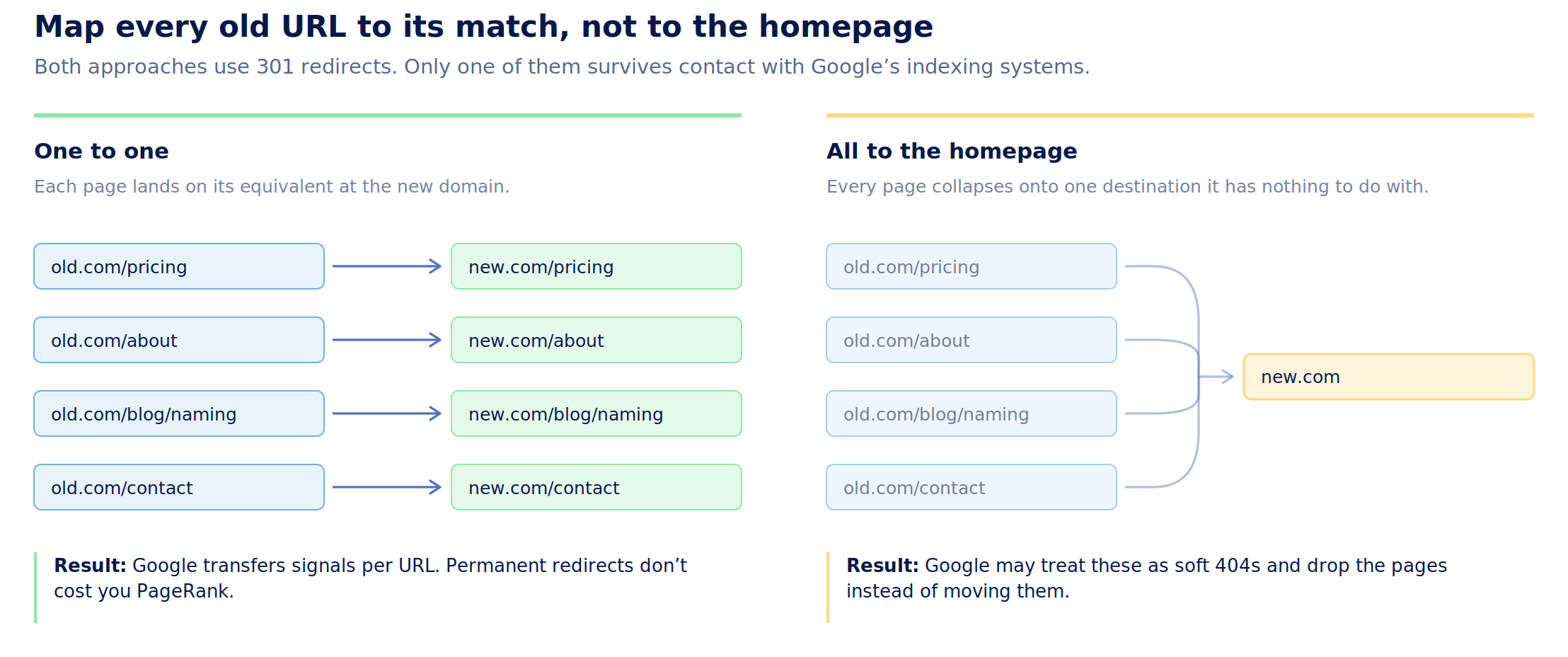
Never redirect everything to the new homepage. Google warns against redirecting many old URLs to one irrelevant destination such as the new home page, because it confuses users and may be treated as a soft 404 error. Note that the risk here is misclassification, not lost authority — Google states plainly that 301 and other permanent redirects don't cause a loss in PageRank.
How to Test Your Redirects Before You Launch
Testing after launch means diagnosing while traffic is already moving. Testing before launch costs nothing.
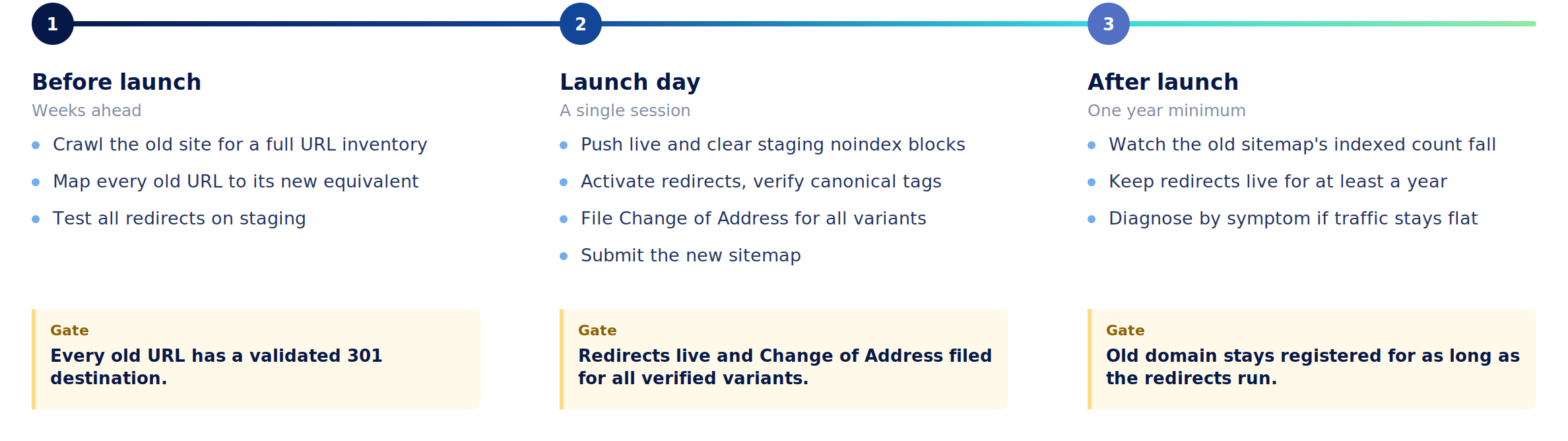
Set up the new site on a staging environment with redirects configured, then crawl your redirect map as a URL list. You are checking three things:
-
Every old URL returns a 301, not a 302 or a 200.
-
Every redirect goes straight to its final destination. Googlebot can follow up to ten hops, but Google advises redirecting directly, keeping any chain to no more than three, since chains add latency for users and not all browsers support long ones.
-
Every destination resolves to real content, not a 404 or a generic category page.
For spot checks, Google points to the URL Inspection Tool for individual URLs and command line tools or scripts for large batches.
Domain Migration Launch Day Checklist in Order
Sequence matters. Do these in order:
-
Push the new site live and confirm it is crawlable, with no leftover noindex tags or robots.txt blocks from staging.
-
Activate the 301 redirects from old to new.
-
Verify canonical tags on the new site point to the new URLs.
-
Test the redirects against your map.
-
Submit the Change of Address request in Search Console.
-
Submit the new sitemap for the new domain.
-
Update internal links, analytics, ads, and business listings to the new domain.
Two things to get right about Change of Address. First, it signals the move to Google; it does not perform the move. Search Console's help documentation says to use the tool after you've moved and redirected your site. Second, one request is not enough.
Google requires a Change of Address for every verified variant of the old domain, including subdomains and www and non-www versions, even ones you aren't actively using — and all of them need to be verified in Search Console first.
How Long Should You Keep 301 Redirects After a Domain Change?
Competing guides suggest three months, six months, or a year. Google's own answer is not ambiguous.
The site move guide says to keep redirects for as long as possible, generally at least one year, because that window lets Google transfer all signals to the new URLs, including recrawling and reassigning links from other sites pointing at your old ones. It goes further: from the users' perspective, consider keeping redirects indefinitely.
One year is the floor, not the target. External links to your old URLs never fully disappear. Renewing the old domain is a small annual cost against permanently orphaning them.
How Long Does It Take to Recover Traffic After a Domain Migration?
Google's stated expectation is that a small to medium-sized website takes a few weeks for most pages to move, with larger sites taking longer, and that the speed depends on how many URLs are involved and how fast your server responds.
A normal migration shows movement in Search Console. Google describes what the sitemaps report should look like: the new URL sitemap starts at zero indexed pages while the old one shows many, and over time the old count drops toward zero as the new count climbs. Impressions on new URLs appear before rankings fully stabilize.
A failure shows no movement at all. If the old sitemap's indexed count isn't falling and the new one isn't rising after several weeks, Google hasn't begun processing the move. Volatility usually means reprocessing is underway. Flatness is the more concerning signal.
How to Fix a Domain Migration That Already Went Wrong
Google publishes a list of common migration mistakes that prevent a new site from being fully indexed. Diagnose by symptom against it.
New URLs aren't indexed. Check for leftover noindex rules and robots.txt blocks first, the ones you added during staging and forgot to remove. Then confirm the sitemap submitted successfully.
Traffic is flat, not recovering. Crawl the old domain's URL list and count how many return 404 instead of 301. Google notes that redirecting to wrong or non-existent URLs on the new site is something it sees frequently, so check destinations, not just status codes.
Crawling stalled or the server struggled. Google crawls a new site more heavily than usual after a migration, because old-site crawls get redirected on top of normal crawling. Underprovisioned servers throttle the move without any obvious error.
Some pages recovered, others didn't. Compare recovered and stalled URLs against your map, then work through Google's traffic drop diagnostics to separate migration damage from unrelated causes.
The old domain expired. Reacquire it if you can and restore the redirects. If it's gone and the brand needs a fresh start, NameClub's marketplace lists brandable domains worth committing to properly the second time.
Recovery is realistic in most of these cases. The exception is a lapsed old domain, where the redirects can't be rebuilt at all.
FAQ
Do I need to keep paying for my old domain after migrating?
Yes, for at least a year, and arguably longer. The redirects only work while you control the old domain, and every external link pointing at your old URLs stops working the moment registration lapses. Treat the renewal fee as part of the migration budget rather than a cost you can cut once traffic recovers.
Can I skip the Change of Address tool if my redirects are set up correctly?
The redirects do the substantive work, so a migration without the tool can still succeed. But skipping it removes a clear signal that the move was intentional and authorized by someone who controls both properties. There's no downside to submitting it, so there's no good reason not to.
What if some old pages have no equivalent on the new site?
Don't force a redirect to a loosely related page or the homepage. If content is genuinely gone, returning a 404 or 410 is the correct response. If several old pages were consolidated into one new page, redirecting all of them to that consolidated page is legitimate.
Should I migrate all at once or in sections?
For small and medium sites, all at once. Google recommends moving everything simultaneously so its systems detect the move and update the index faster. Section-by-section moves make sense mainly for large sites, where staged migration makes problems easier to isolate and fix.
Does a new domain start from zero authority?
Not if the migration is executed properly. Permanent redirects pass signals from the old URLs to the new ones, which is the entire mechanism a migration depends on. A new domain behaves like a blank slate only when redirects are missing, broken, or removed too early.