ショッピングカートにドメインがありません
TL;DR
-
ドメインリダイレクトは、あるドメインから別のドメインへすべてのトラフィックを自動的に送信します — 訪問者による操作は必要ありません。
-
使用する 301リダイレクト 恒久的な移行には。 aを使用してください 302 短期間で可逆的な状況のみ。
-
レジストラのURL転送は、パーキング中のドメインや未使用のドメインに適しています。稼働中のサイト移行には信頼できる方法ではありません。
-
正しく実装された301はランキングシグナルを新しいドメインに引き継ぎますが、移行には数日から数週間かかります — その間に検索結果に古いURLが表示されるのは正常です。
-
リダイレクトは少なくとも1年間はそのままにしておいてください。早期に削除すると、転送されたシグナルを失うリスクがあります。
ドメインリダイレクトとは何か(そして何ではないか)
ドメインリダイレクトは、あるドメインを訪問した人を自動的に別のドメインへ送ります。古いアドレスを入力すると、新しい方にたどり着きます — 訪問者による手動操作は不要です。
この記事で扱う ドメイン全体のリダイレクト: ドメイン全体を別のドメインにポイントすることです. 個々のページ, サブドメイン, メールアドレスのリダイレクトは対象外です. リブランディング, ドメインのパーキング, トラフィックのあるドメインの販売を行っているなら, ここが適切です.
どのドメインリダイレクト方法が必要ですか?
設定に手を加える前に、まず自分の状況を把握してください。どの方法が適しているかは、そのドメインが現在何をしているかに完全に左右されます。
| あなたの状況 |
正しい方法 |
| ライブウェブサイトを新しいドメインにリブランディングする |
.htaccess (またはサーバー設定) |
| 非アクティブなドメインのパーキング, 売却, またはポイント設定 |
レジストラのURL転送 |
| フルサーバーアクセスを伴う高トラフィック移行 |
NginxまたはApacheのサーバー設定 |
上記の表から方法を選び、そのセクションにスキップしてください。3つすべてを読む必要はありません。
301 対 302 リダイレクト: どちらを使うべき?
リダイレクトを設定する前に、どのタイプを使用するかを知る必要があります — この決定はSEOに直接影響するからです。
A 301リダイレクト ブラウザと検索エンジンに、その移転が恒久的であることを伝えます。検索エンジンは古いドメインから新しいドメインへランキングシグナルを移し、最終的には古いURLのインデックスを停止します。 Google Search Centralが確認しています URLの変更が永続的であることを意図している場合は常に、永続的なサーバーサイドリダイレクトが推奨される方法であること。
A 302リダイレクト 一時的な移転を示します. 検索エンジンは古いURLをインデックスに残し, ランキングシグナルは元のドメインにとどまります. 302は, リダイレクトが本当に短期間の場合にのみ使用してください — メンテナンス期間, 一時的なキャンペーンのランディングページ, または元に戻す予定のテストなどです.
永続的なドメイン変更を行うほとんどの読者は、めったに、いや決して302を使うべきではありません。迷ったら:301を使いましょう。
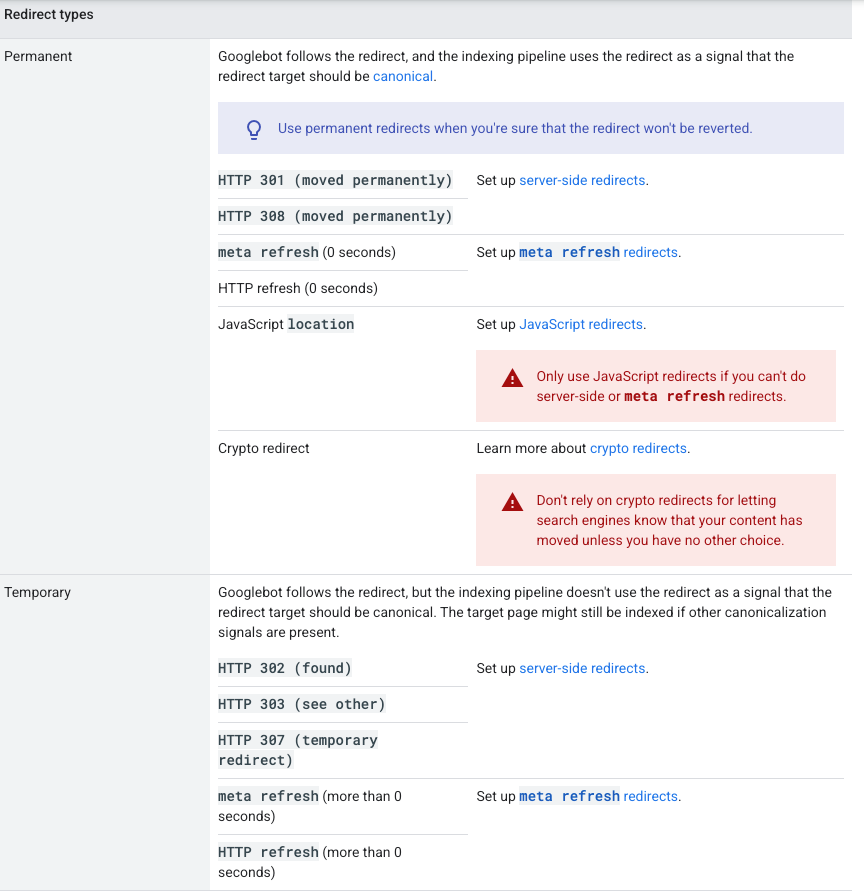
メモ: HTTPには307と308のリダイレクトコードもあります. これらは機能的にはそれぞれ302と301に似ていますが, リダイレクトをまたいでHTTPリクエストメソッドを保持します. このガイドの範囲外ですが, 存在することを知っておく価値はあります.
レジストラのURL転送を使ってドメインをリダイレクトする方法
レジストラの転送は最速のオプションで, ホスティングもサーバーアクセスもコードも必要ありません. レジストラにログインし, 自分のドメインの転送またはリダイレクト設定を見つけ, 宛先URLを入力し, 301を選択して保存します.
この方法は次の場合に適しています:
-
どこかにポイントさせたいパークドメイン
-
売却したのにまだトラフィックがあるドメイン
-
ブランド保護のために所有している非アクティブなドメイン
この方法はライブサイトの移行には適していません. レジストラの転送は通常 URLパスを保持しません — つまり olddomain.com/about に転送されます newdomain.com 、ではない newdomain.com/about . インデックスされたページとバックリンクがあるライブサイトにとって, それは重大なSEO問題です. 一部のレジストラはオプションとしてパス転送を提供していますが, サポート状況は異なります — これが利用可能だと想定する前に, レジストラのドキュメントを確認してください.
HTTPSの注意事項: レジストラのHTTPSからHTTPSへの転送サポートは、プロバイダーによって異なります。それに頼る前に、あなたのレジストラがこれを正しく処理できるか確認してください。もし処理できない場合、セキュアな接続を使っている訪問者にブラウザの警告が表示されることがあります。確認するには、レジストラのヘルプドキュメントをチェックしてください。
DNSの伝播: レジストラレベルの転送を保存したら、変更が完全に反映されるまで最大48時間待ちます。リダイレクトがすぐに機能しているように見えなくても、トラブルシューティングの前に待ちましょう。
.htaccessでドメインをリダイレクトする方法 (ライブサイトに最適)
あなたのサイトがApacheホスティングで実行されている場合、その .htaccess ファイルが適切なツールです. HTTPSをきれいに処理し, URLパスを保持し, 適切なサーバーサイド301を介して完全なリンクエクイティを渡します. Apacheは共有ホスティングで最も一般的な環境であり続けていますが, ホストがNginxを使用している場合は, 以下のセクションを参照してください.
手順:
-
FTPまたはホストのファイルマネージャーでサーバーにアクセスします
-
リダイレクトしているドメインのルートディレクトリに移動します 差出人
-
次の名前のファイルを開くか作成する .htaccess
-
次のコードを追加してください:
Rewrite Engine On
# 古いドメインのwww版とnon-www版の両方にマッチさせる
Rewrite Cond %{HTTP_HOST} ^olddomain\.com$ [OR]
Rewrite Cond %{HTTP_HOST} ^www\.olddomain\.com$
# すべてのパスを新しいドメインに恒久的にリダイレクトし, URLパスを保持する
Rewrite Rule ^(.*)$ https://newdomain.com/$1 [R=301,L]
-
保存とテストをHTTPステータスチェッカーで行いましょう (無料ツールを探すには "redirect path checker" を検索)
置き換える olddomain.com そして newdomain.com 実際のドメインで.
重要: 同じドメインでレジストラの転送が有効になっている場合は, 追加する前に無効にしてください .htaccess ルール。両方を実行するとリダイレクトチェーン(後述)が作成され、SEOパフォーマンスが低下し、ブラウザエラーの原因になることがあります。
NginxまたはApacheのサーバー設定ユーザー向け
自分のサーバーを直接管理しているなら, 使う代わりにこれをサーバーブロックに追加してください .htaccess :
server {
listen 80;
server_name olddomain.com www.olddomain.com;
# リダイレクト時に完全なURLパスを保持する
return 301 https://newdomain.com$request_uri;
}
これはアプリケーションコードが実行される前にリダイレクトを処理するため, 高トラフィックのサイトでより効率的です. サーバー設定ファイルに直接アクセスでき, 編集に抵抗がない場合はこれを使用してください. Google Search Central's サイト移行ドキュメント サーバーサイドリダイレクトを最も確実に解釈される方法として推奨しています.
ドメインをリダイレクトするとSEOに何が起こるか
正しく実装された301は、移転先ドメインにランキングシグナルを確かに転送します。ただし、その転送は即時ではありません。
新しいドメインにリダイレクトしても、新しいURLがインデックスされた後でも、Googleは検索結果に古いURLをときどき表示し続けることがあります。これは正常な動作で、リダイレクトが失敗したわけではありません。古いURLは"代替名"として機能し、ユーザーとクローラーが新しいドメインに慣れるにつれて検索結果から消えていきます。
この期間中は、2つ目のリダイレクトを設定したり、変更を加えたりしないでください。 Googleに独自のスケジュールでクロールと再インデックスをさせてください。
移行が完了すれば, 新しいドメインが権威を引き継ぎます. GoogleのGary Illyes氏もアドバイスしています 少なくとも12か月間は有効にしておき, ランキングシグナルが完全に移行できるようにします. 他のサイトが古いドメインにリンクしている場合, リダイレクトを長期間そのままにしておくことで, それらの訪問者とシグナルが引き続き正しい宛先に到達します.
リダイレクトチェーンとは何か、そしてどう修正しますか?
リダイレクトチェーンは、訪問者やクローラーが最終的な遷移先にたどり着くまでに複数のリダイレクトをたどらなければならない場合に発生します。追加のホップごとにレイテンシが増し、遷移先に渡される正規のシグナルが弱まる可能性があります。 Googleは、最終的な遷移先へ直接リダイレクトし、チェーンを最小限に抑えることを明確に推奨しています。
チェーンが通常どのように形成されるか:
-
レジストラの転送を設定した元は olddomain.com 宛先 newdomain.com
-
後で追加します .htaccess 新しいサーバー上のルール
-
リクエストは今, レジストラのリダイレクトに到達し, 次にサーバーリダイレクトに到達します — 1回ではなく2回のホップです
その診断方法: 任意のHTTPステータスチェッカーにドメインを入力してください。最終URLに到達する前に複数の301が表示される場合、チェーンができています。
解決方法: チェーン内の最初のリダイレクトを特定し、最終的な遷移先URLに直接向くように更新します。中間のリダイレクトはすべて削除します。目標は、オリジンから遷移先への1回の301だけ — その間に何もない状態です。
ドメイン投資家への注意事項
すでにリダイレクトが設定されているドメインを売買する場合は、取引を完了する前にリダイレクト経路を確認してください。
競合サイト, パーキングページ, または無関係な宛先を指す有効なリダイレクトは, 検索エンジンが現在そのドメインのシグナルをどう関連付けているかに影響します. 購入したドメインを自分でリダイレクトする前に, 3つのチェックを実行してください:
-
リダイレクトパスを確認する HTTPステータスチェッカーを使用して — 現在どこを指しているか、チェーンに何回のホップがあるかを確認してください
-
バックリンクのリンク先を確認する バックリンクツールを使って — そのドメインのリンクエクイティが現在どこに流れているかを理解しましょう
-
インデックス登録状況を確認する Google検索で — 検索 site:olddomain.com Googleが現在そのドメインでインデックスしているものを確認するには
トラフィックのあるドメインを売却する場合、レジストラ転送が最もクリーンな引き渡し方法です — アクティブなホスティングは不要で、ドメインの所有権が変わっても簡単に移行できます。
よくある質問
ドメインをリダイレクトするとSEOに悪影響はありますか?
正しく実装された301リダイレクトはSEOを損ないません。 Googleはサーバーサイドの恒久的なリダイレクトを強力なcanonicalシグナルとして扱い、ランキングシグナルを遷移先ドメインに引き継ぎます。
主なリスクは実装ミスです — たとえば、301ではなく302を使う、リダイレクトチェーンを作る、シグナルが完全に統合される前にリダイレクトを早すぎるタイミングで外す、などです。
SEOで301リダイレクトが効果を発揮するまでどれくらいかかりますか?
Googleは通常、301の処理とランキングシグナルを新しいドメインに関連付ける作業を、Googlebotがあなたのサイトをクロールする頻度に応じて、数日から数週間以内に開始します。
この期間中は、検索結果に古いURLがまだ表示されることがあります。これは想定された動作であり、失敗ではありません。この期間は変更を避け、Googleが独自のスケジュールで再インデックスするのを待ちましょう。
ライブサイトの移行にレジストラのURL転送は使えますか?
信頼できないことが多いです。レジストラの転送は通常、ルートドメインのみをリダイレクトし、URLパスは保持しません。つまり olddomain.com/contact に辿り着きます newdomain.com ではなく newdomain.com/contact , これは訪問者に壊れた体験を生み出し, 特定のページが期待された場所にもはや存在しないことを検索エンジンに示します. ライブサイトの移行では, 代わりに .htaccess またはサーバーレベルのリダイレクトを使用してください.
301リダイレクトと302リダイレクトの違いは何ですか?
301リダイレクトは恒久的なものです — ブラウザや検索エンジンに、ページやドメインが完全に移動したことを伝え、ランキングシグナルは新しいURLに引き継がれます。302リダイレクトは一時的なものです — 検索エンジンは元のURLをインデックスに残し、シグナルは元の場所にとどまります。
恒久的に維持するつもりのドメイン移転では、301を使用してください。302は、リダイレクトを元に戻す予定の短期的な状況でのみ使用してください。
301リダイレクトはどのくらいの期間設定しておくべきですか?
Googleは、ドメイン移行後、少なくとも1年間はリダイレクトを維持することを推奨しています。他のウェブサイトが古いドメインにリンクしている場合、リダイレクトを長期的に有効にしておくことで、それらのリンクが正しい遷移先に到達し続け、関連するシグナルが失われないようにできます。
シグナルが完全に統合される前にリダイレクトを早まって削除するのは、移行後によくあるミスのひとつです。